You shout. We write.
Just say what you mean. Shout turns your speech into clean, ready-to-send text in any Mac app — spelling, punctuation, and polish handled.
Apple Silicon · macOS 26+ · Free & open source (GPL-3.0)

Speak. It types. That's it.
Three stages, all on your Mac — from key-press to clean text in whatever app you're using.
Hold fn & speak
Press and hold the fn key and talk naturally in German or English. Double-tap to go hands-free; Esc cancels anytime.
Transcribed on-device
Your words become text instantly, right on your Mac — audio never touches the network or the disk. Under the hood: whisper.cpp (large-v3-turbo), Metal-accelerated on Apple Silicon.
Polished & inserted
Apple Intelligence cleans it up on-device — removing "ähm"s, false starts, and fixing grammar — then Shout types the clean text wherever your cursor is.
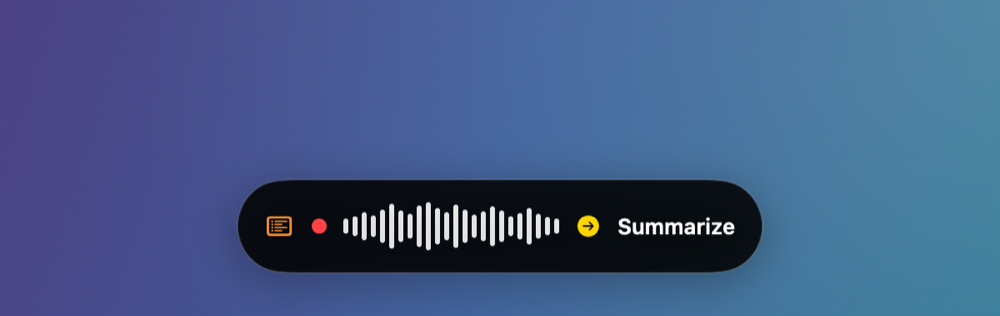
One glanceable status pill.
A floating capsule, or docked to the Dynamic Island — with an optional live transcript while you speak. It also takes voice commands, so you can steer Shout without touching a key.
Switch profiles by voice.
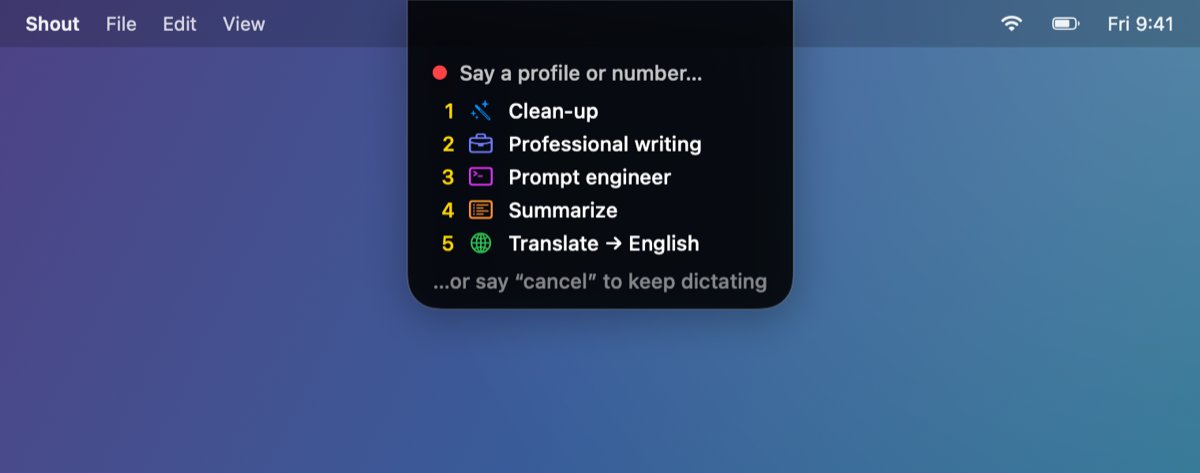
Profiles change what Shout writes — clean it up, make it professional, summarize it, translate it to English. Pick one without touching a key:
-
Begin with "use profile". The pill lists your profiles, numbered.
-
Say a name or a number. It's forgiving — "professional" is enough, and "cancel" backs out.
-
Keep talking. The command never lands in your text — the rest comes out in that style.
One breath works too: "use profile summarize, quick recap of today's standup…"
Small menu-bar app. Serious dictation.
Everything you need to talk instead of type — and nothing you don't.
Push-to-talk & hands-free
Hold fn, or double-tap to lock hands-free recording. Esc cancels while recording, transcribing, or polishing.
German & English
Auto-detected as you speak, and fully fluent in both. Force a language in Settings if you prefer.
On-device speech-to-text
whisper.cpp large-v3-turbo, Metal-accelerated on Apple Silicon. Works fully offline once the model is downloaded.
AI cleanup
Apple Intelligence fixes fillers, false starts, and grammar — right on your Mac.
Local history
Every dictation (raw + cleaned) is kept locally and searchable. Optional, and never uploaded — turn it off or clear it anytime.
Glossary
Teach Shout the exact spelling of names, products, and jargon so they come out right every time.
Inserts anywhere
Types into any app via a concealed paste, then restores whatever was on your clipboard.
Pauses your music
Pauses Spotify or Apple Music the moment you start dictating, and picks it back up when you're done.
Bring your own model
Power users can route cleanup through any OpenAI-compatible endpoint — and give each profile its own model and prompt.
Private by default.
Most dictation tools stream your voice to the cloud. Shout doesn't. Everything happens on your Mac unless you deliberately decide otherwise.
- Transcription & cleanup are on-device. whisper.cpp and Apple Intelligence both run on your Mac.
- Works fully offline. After the one-time speech-model download, dictation needs no internet connection at all.
- History never leaves. It's stored locally and is never uploaded.
The one exception: if you connect a remote cleanup endpoint, that dictation's transcript is sent there to be polished. Shout marks it in the model list, under the picker, and on the pill — and your audio still never leaves the device.
Download it, or build it yourself.
Requirements
- macOS 26 or later, on Apple Silicon
- ~2 GB free disk for the on-device speech model
- Apple Intelligence enabled — optional, for the cleanup pass
- Building from source? Xcode 26+
Download for macOS
Prebuilt app · version v1.0.0 · Apple Silicon
First launch
xattr -dr com.apple.quarantine /Applications/Shout.app
Build from source
Clone the repo and let the Makefile do the rest.
git clone https://github.com/Andreas-Menzel/shout-ai.git shout-ai
cd shout-ai
make setup   # whisper framework + speech model (~1.6 GB)
make cert    # optional: stable signing so permissions survive rebuilds
make run     # build build/Shout.app and launch it
Questions, answered.
Is it really private?
Do I need Apple Intelligence?
Does it work offline?
Which languages are supported?
Is it free? What's the license?
Can I use my own cleanup model?
What are the system requirements?
Why won't it open on first launch?
xattr -dr com.apple.quarantine /Applications/Shout.app
Worth a coffee?
Built in my spare time and released under the GPL — no accounts, no tracking, no paid tier. Enough coffee would cover an Apple developer account, so first launch stops being awkward.
Talk. Let Shout do the typing.
Local-first dictation for macOS — private, fast, and free.